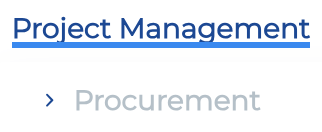
I tried the other effects, but they are different from what our client want, i.e. wat is schown in the screenshot, so there is no way to lower it through CSS or so?
We use cookies to personalise content and ads, to provide social media features and to analyse our traffic. We also share information about your use of our site with our social media, advertising and analytics partners who may combine it with other information that you’ve provided to them or that they’ve collected from your use of their services.
Cookies are small text files that can be used by websites to make a user's experience more efficient.
The law states that we can store cookies on your device if they are strictly necessary for the operation of this site. For all other types of cookies we need your permission. This means that cookies which are categorized as necessary, are processed based on GDPR Art. 6 (1) (f). All other cookies, meaning those from the categories preferences and marketing, are processed based on GDPR Art. 6 (1) (a) GDPR.
This site uses different types of cookies. Some cookies are placed by third party services that appear on our pages.
You can at any time change or withdraw your consent from the Cookie Declaration on our website.
Learn more about who we are, how you can contact us and how we process personal data in our Privacy Policy.
Please state your consent ID and date when you contact us regarding your consent.


Comments
Hi,
You can change the line color in the Style tab of the menu element:
But there is no setting to lower it. You can try other animation styles as they are all located in different places of the menu item.
Best regards
Thanks for your reply.
I tried the other effects, but they are different from what our client want, i.e. wat is schown in the screenshot, so there is no way to lower it through CSS or so?
With some CSS code, it could be achievable. If you sent a link to your website, I can check this out.
Best regards
You already have those details, I have sent them through code canyon DM, regarding this post: https://forum.muffingroup.com/betheme/discussion/80722/templates-not-showing#latest
Do you still have them?
Try the following CSS code:
.mfn-menu-animation-text-line-bottom > .mfn-menu-li > .mfn-menu-link .label-wrapper::before{
 top: 120%!important;
}
Put it in Betheme -> Theme options -> Custom CSS & JS -> CSS.
Best regards
Brilliant! Thanks for the help!