
BeTheme: Global Styles show correctly in BeBuilder, but not on Frontend (Footer Menu)

Hello BeTheme Support Team,
I am having an issue with Global Styles in BeTheme, specifically for the footer menu.
https://2026.fotoschuster.com/
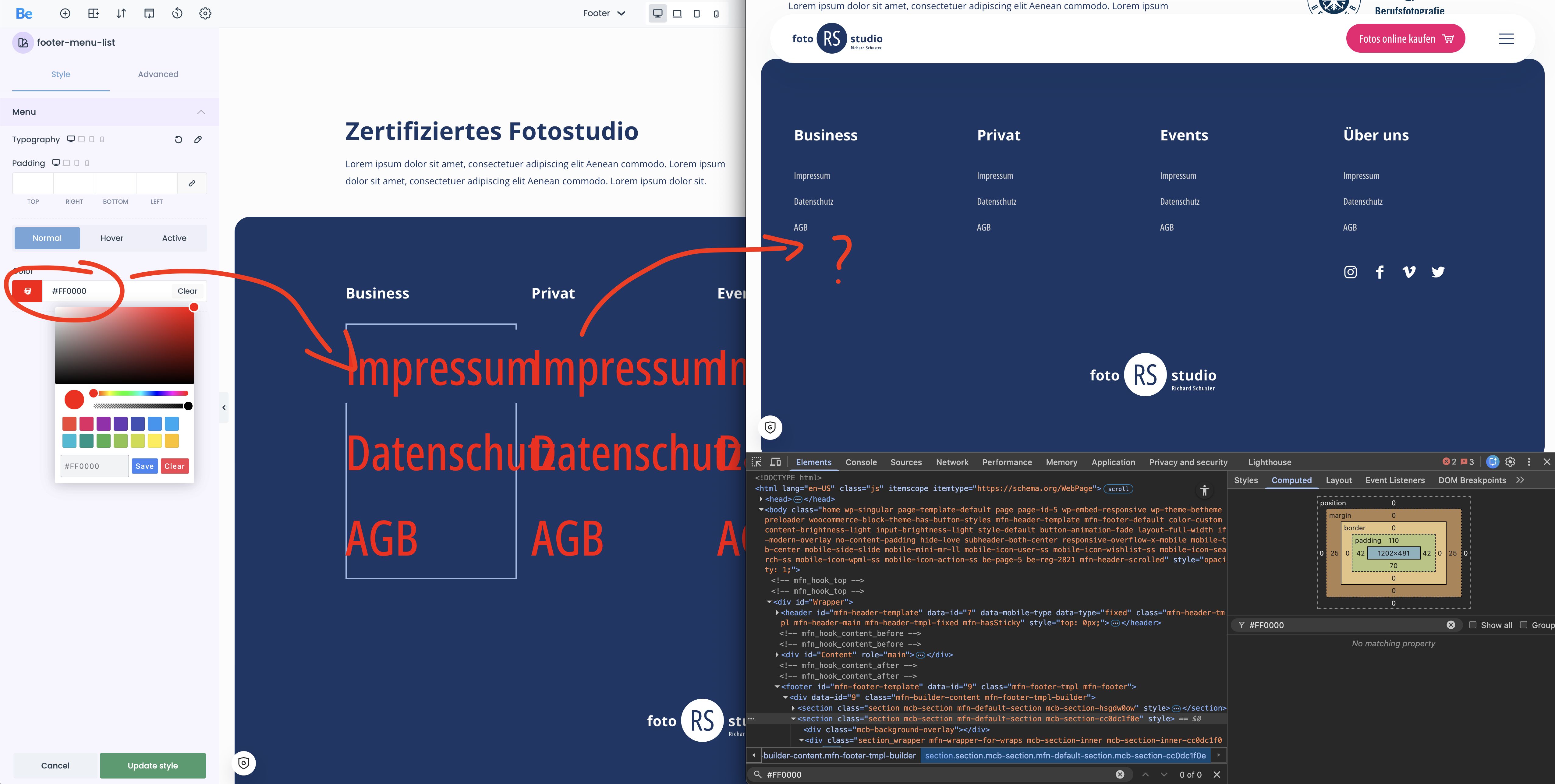
In the admin area inside BeBuilder, the styles are displayed correctly. However, on the live website frontend, none of these styles are applied. This seems to affect the menu inside my footer template.
Example:
I set the footer menu link color via Global Styles (e.g., #FF0000). It looks correct in the builder preview, but on the frontend the footer menu stays unchanged.
Could you please help me understand why the builder shows the correct styling but the frontend does not apply it? Also, what should I check first (e.g., BeTheme CSS regeneration, caching/minification, CDN cache, custom CSS overriding, or theme options that prevent Global Styles from loading)?
Thanks a lot.
Best regards
Michael
Comments
Hello,
Please, turn off all of the plugins, refresh your cache, and check if the problem persists.
Moreover, if you use a child theme, switch to the parent, and recheck it.
Thanks
Hello Phil,
Thanks for your message.
I disabled all plugins and cleared the cache, but the issue still persists on the frontend. The Global Styles appear correctly in the BeBuilder/admin area, however on the live website they are not applied, specifically for the footer menu.
I am not using a child theme, so there is no child to parent switch to test.
Please let me know what else I should check next.
Thanks
Michael
Please send us the WordPress dashboard and FTP access privately through the contact form, which is on the right side at https://themeforest.net/user/muffingroup#contact and we will check what might be the reason.
Notice!
Please attach a link to this forum discussion.
Sending incorrect or incomplete data will result in a longer response time.
Therefore, please ensure that the data you send are complete and correct.
Thanks
Thank you, I have sent you an email via contact form with all the details.
You had URLs set to HTTP while your website use SSL, and should be set to HTTPS.
I have changed it, and it works properly now.
Best regards