
Empty categories with BeBuilder

Hello, I am creating the mega menus with BeBuilder and everything is working perfect except for one detail.
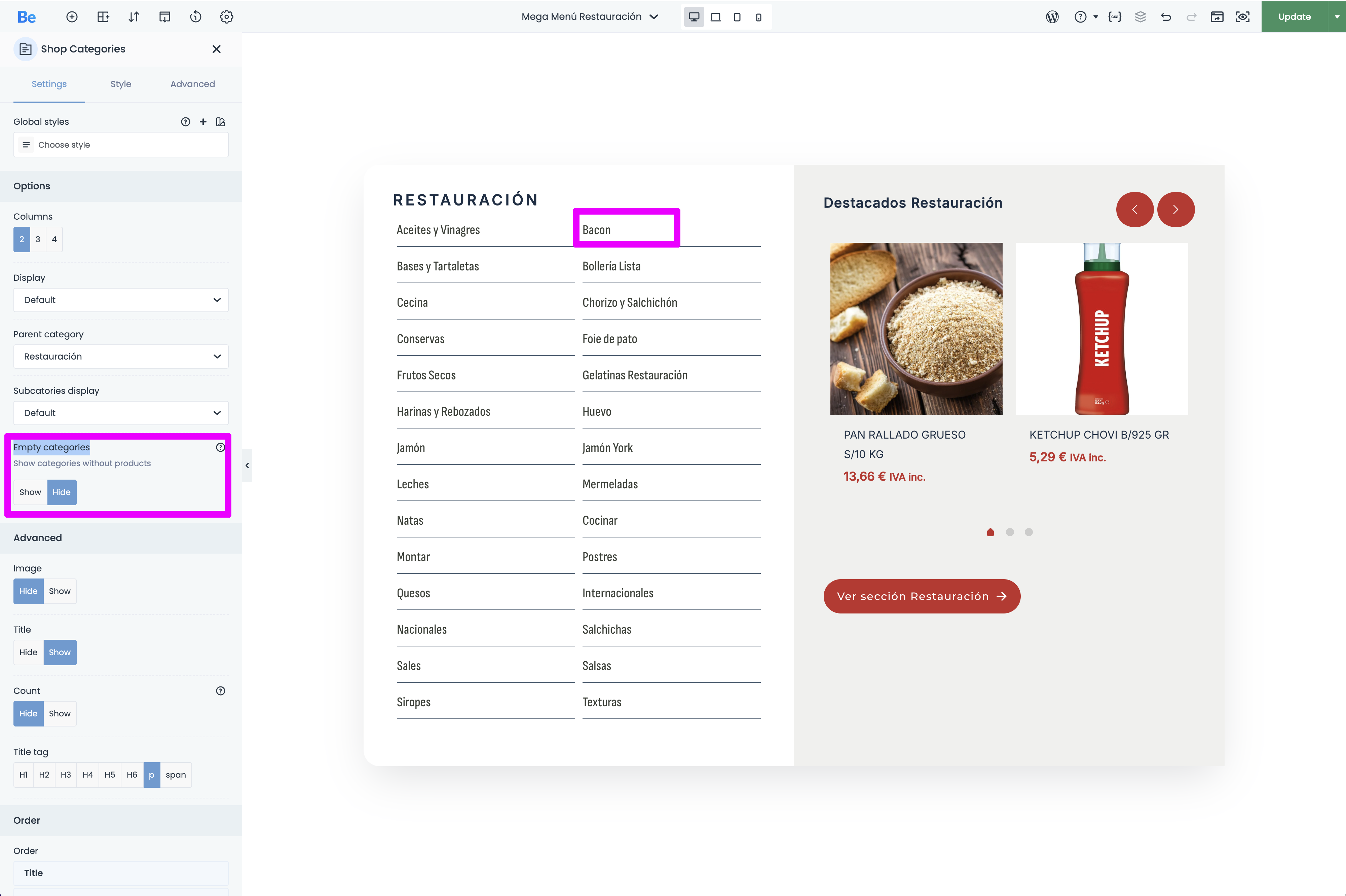
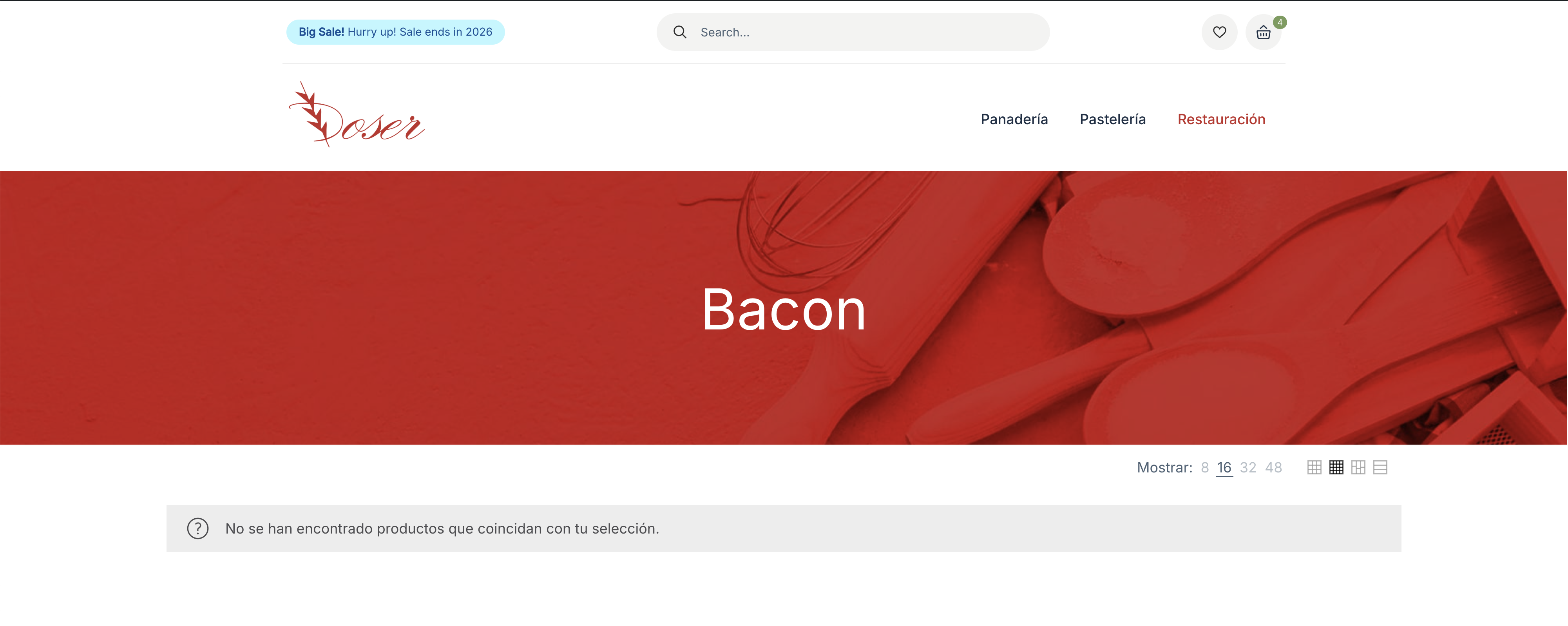
The menus show the shop categories and I have activated "Hide Empty Categories", but they are showing and I don't know why.
I need to fix this because the menu can't have a button that takes you to an empty category.
You can see the problem in the images attached.
Comments
Hi,
Please always attach a link to your website so we can check it out. If the page is offline(localhost), then our help will be limited. You will have to contact us when the page is online. Also, please make sure that the page is not under maintenance before you provide us with the link.
Thanks
Hello, you can see the website here:
[Links visible only for registered users]
Please send us the WordPress dashboard and FTP access privately through the contact form, which is on the right side at [Links visible only for registered users] and we will check what might be the reason.
Notice!
Please attach a link to this forum discussion.
Sending incorrect or incomplete data will result in a longer response time.
Therefore, please ensure that the data you send are complete and correct.
Thanks
Ok, i have just sent the message with all the information.
Thank you,
Sara.
You have restrictions set to your websites dashboard:
I am not allowed to provide an IP address, so can you disable it for a while, please?
If it is possible, you can instead whitelist a country. We are located in Poland.
Best regards
Sorry, but i don't know how to do that, i haven't restricted anything willfully.
Can you help me to do that?
Most likely, it is your hosting feature, so you should contact your hosting provider regarding this.
Best regards
Hello, the hosting provider has told me this:
For entering the website, you only have to add an allowed language to the browser.
For example, in Chrome:
After doing this, you have to delete cache and cookies and restart the program, so you can access to the website.
Please, let me know if this works for you.
Kind Regards,
Sara.
Thanks for the explaination. I was able to access WP login panel, but the credentials you sent does not work:
Also, the FTP access led to an empty catalog:
Please resend the private message, but double-check if the credentials are correct and working. Remember to attach a link to this forum discussion.
Thanks
Hello, sorry for the mistake.
Everything is working now with the same credentials as before.
I have sent you a new message in case you need it.
Kind regards,
Sara.
The newest credentials you sent works properly, thanks.
There are products in this category, and this option takes the information from here:
The problem is that two of these products are out of stock, and one is set to be hidden:
For this item we use
get_terms( 'product_cat', [ 'hide_empty' => true ] )andhide_emptyuses the taxonomy’s stored term counts (relationships to published products). It does not know about Woo’s “catalog visibility” (hidden / exclude-from-catalog) or “hide out of stock items”, because those are implemented via product visibility taxonomy/meta filtering at query time, not by changing the term’s base count.There is a workaround by using the following CSS code:
.mfn-megamenu-grid .shop_categories .products .product-category:has(a[href*='bacon']){
 display: none;
}
But there will be an empty space after removing the category:
You must decide if it is a big deal for you or not.
If you will use this CSS code, put it in Betheme -> Theme options -> Custom CSS & JS -> CSS.
Best regards
Hello,
I understand what you say, but we have this exactly website with elementor (we are changing it because it is really slow due to a bad theme), and with elementor we hide the categories and it doesn't show the ones with hidden or out of stock products.
This is really important for us because the menu has to be like this, and we can't show empty buttons or empty spaces.
If this can be done with elementor, I am sure that it can be done with your BeBuilder.
Maybe the code get_terms( 'product_cat', [ 'hide_empty' => true ] ) has to be changed in order to not showing those categories.
You can see the other website here, with the same menu and no "Bacon" button:
[Links visible only for registered users]
Here you can see the image attached, so you can see the elementor and then the website not showing those categories:
Please, I need to fix this. The website has to show or hide categories automatically according to its products and I have all the menus ready except for this detail.
Kind regards,
Sara.
Thanks for the information. I was not aware of this option in Elementor.
I have contacted the dev team, and I will validate if and how they resolved it, and if we can implement that in Betheme.
Best regards
Hello, thank so much for your feedback.
In case it help you, I have used the plugin "Automatically Hierarchic Categories in Menu" in new.doser.es, to show active categories in the mobile menu. This plugin works as the elementor, it doesn't show the ones with hidden or out of stock products.
Hope you can fix this in BeBuilder.
Kind regards.
Sara.
Hello! I have to make the presentation of the new website tomorrow. Do you think that you will have soon some update about this?
Thank you!
Sara.
Unfortunately, not, because it is a larger modification, and we also must work on other features as well.
But I assure you that we have it on our focus, and we will try to implement that.
Best regards
Ok, please, let me know when you implement this because I really need it.
Thank you!