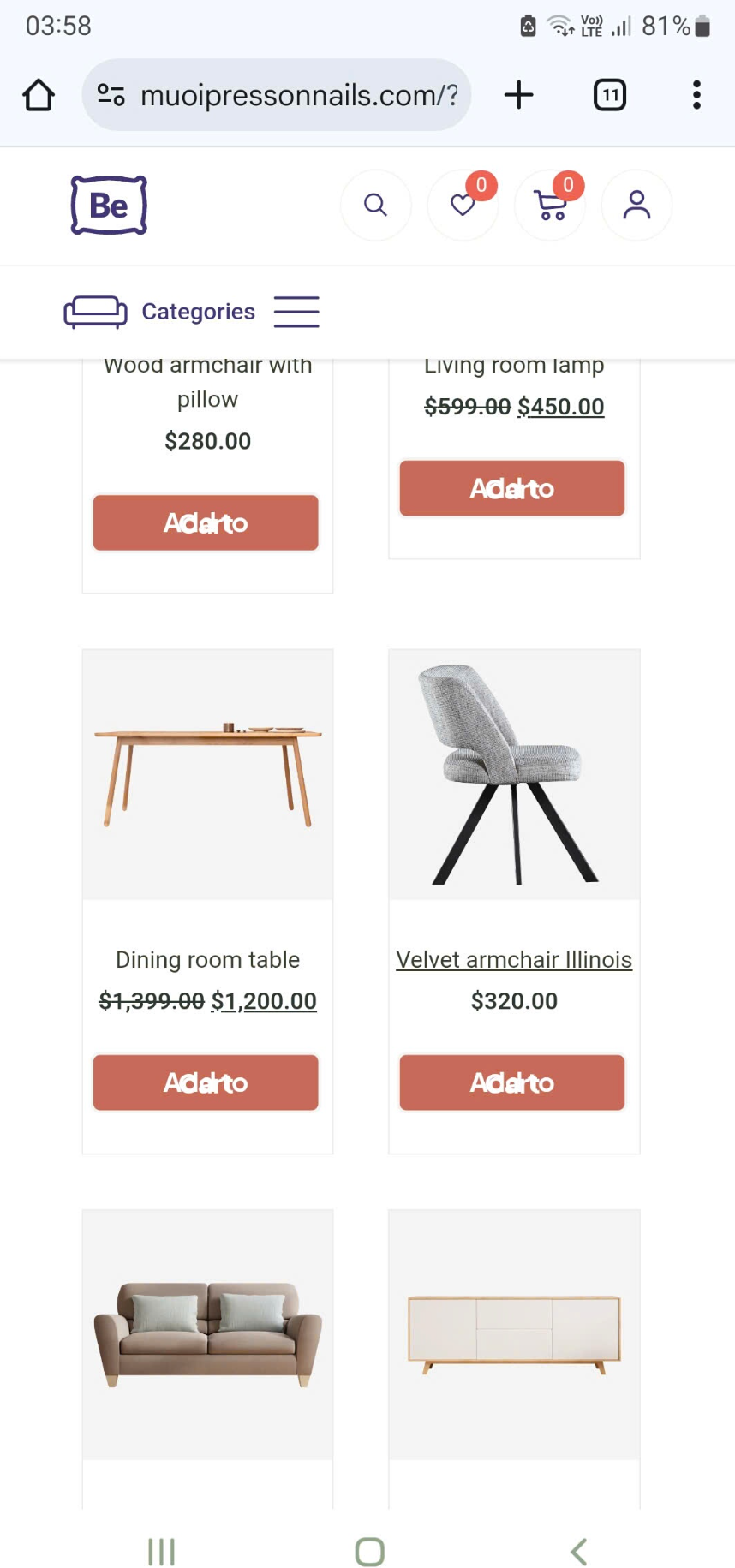
The "Add to Cart" feature on my mobile device is overlapping and the product images are a bit small, resulting in a poor user experience. Can you help me fix this?
Please send us the WordPress dashboard access privately through the contact form, which is on the right side at [Links visible only for registered users] and we will check what might be the reason.
Notice!
Please attach a link to this forum discussion.
Sending incorrect or incomplete data will result in a longer response time.
Therefore, please ensure that the data you send are complete and correct.
I still haven't fixed the line break issue in the product descriptions. I edited the style on PC 1, but after updating and checking again, the line breaks still occur.
We use cookies to personalise content and ads, to provide social media features and to analyse our traffic. We also share information about your use of our site with our social media, advertising and analytics partners who may combine it with other information that you’ve provided to them or that they’ve collected from your use of their services.
Cookies are small text files that can be used by websites to make a user's experience more efficient.
The law states that we can store cookies on your device if they are strictly necessary for the operation of this site. For all other types of cookies we need your permission. This means that cookies which are categorized as necessary, are processed based on GDPR Art. 6 (1) (f). All other cookies, meaning those from the categories preferences and marketing, are processed based on GDPR Art. 6 (1) (a) GDPR.
This site uses different types of cookies. Some cookies are placed by third party services that appear on our pages.
You can at any time change or withdraw your consent from the Cookie Declaration on our website.
Learn more about who we are, how you can contact us and how we process personal data in our Privacy Policy.
Please state your consent ID and date when you contact us regarding your consent.


Comments
The "Add to Cart" feature on my mobile device is overlapping and the product images are a bit small, resulting in a poor user experience. Can you help me fix this?
Hi,
You have a line-height set to 1px assigned to the button:
It seems that it is set through the style tab.
Please check the typography for that element.
Best regards
Currently, I'm experiencing two issues:
1: The "Add to Card" section is causing line breaks; I want it to be smaller.
2: The product line is smaller than the image.
3: When I edit the theme in the mobile section, it displays one way, but when I update, it malfunctions. I don't understand why.
1) You can decrease side padding for the button on mobile view:
2) Your images have a transform set to scale up.
Edit this element, go to Advanced -> Transform, and set ScaleX and ScaleY to 1:
3) I am sorry, but I do not know what you are talking about. Please explain that in more detail.
BTW, note that border width cannot be negative.
Best regards
Currently, I'm experiencing these two issues:
1: The images are too close together; how can I create space between them?
2: The border cannot be enlarged or removed.
Currently, I don't know where this error is.
- Image 1: On the phone
- Image 2: Incognito mode
- Image 3: In BeTheme
Could BeTheme be experiencing lag, or am I doing something wrong?
1) As I mentioned im my previous message, you have "transform: scale" set for your images:
When you set it to 1, space between images will be larger.
2) I can see that you removed the border. Do you still need help with that?
3) You are checking different mobile widths.
Edit your Query Loop, and decrease items width for mobile display.
Best regards
I still don't understand:
Image 1: Incognito browser
Image 2: Theme setup
Image 3: Mobile and mobile web
I don't understand why it's displaying incorrectly. Could you please check and fix it for me?
Please send us the WordPress dashboard access privately through the contact form, which is on the right side at [Links visible only for registered users] and we will check what might be the reason.
Notice!
Please attach a link to this forum discussion.
Sending incorrect or incomplete data will result in a longer response time.
Therefore, please ensure that the data you send are complete and correct.
Thanks
The version is completely different; I modified it in the theme, but the layout doesn't match on the phone.
I still haven't fixed the line break issue in the product descriptions. I edited the style on PC 1, but after updating and checking again, the line breaks still occur.
You still have scalling set for the images:
Change it to 1.
Also, reduce the margins on mobile view in the Query Loop.
Can you tell me why do you use transforms there?
I do not see any reason why your layout would need that.
Just switch the places of the button and text:
Best regards