
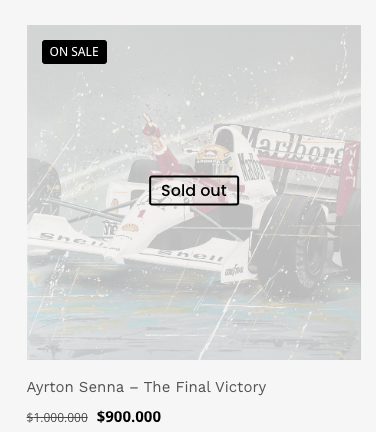
SOLD tag on product

Hello,
Please how can i edit the sold tag on my product?, are there other options to show it, like add it out side from the image on the bottom ?
Can i reduce the transparent on sold product ?
As well on hover it is canceling the view for the gallery images how can it be change to stay normal?
Thank you
Comments
Hi,
No, there is no option to show sould out tag outside the image.
The transparency can be reduced by using a custom CSS code. If you send a link to your website, we can help you write it.
Please provide more detail on what gallery images you refer to.
Best regards
Hello,
Thank you, so as i understand it is only possible to reduced the transparency for the images that are SOLD OUT
Is it posible to control the text to change it to SOLD what about the color or the outlines for the SOLD OUT can it be change?
Please let's have the css custom to my SOLD OUT images
Please atteched is my shop page [Links visible only for registered users]
as well i'm using the shop element in my home page
Thank you
Sold out text can be changed in Betheme -> Theme options -> Shop -> General:
To reduce transparency, use the following CSS code:
.products .product.outofstock .product-loop-thumb .image_wrapper img {
 opacity: .5!important;
}
Put it in Betheme -> Theme options -> Custom CSS & JS -> CSS.
The color of the sold-out text is taken from Betheme -> Theme options -> Colors -> Headings: H4:
If you do not want to change all H4 on your website, you can use the following CSS code:
.products .product .soldout h4{
 color: #f00!important;
}
Best regards
Thank you,
the CSS code are working good! but still it does not looks good on the image this tag is very limited to customize
Can i have it like solid color and not only outline? Can it be increased?
Please replace the last CSS code I sent you with the following one:
.products .product .soldout{
 background: #000;
 border-radius: 4px;
}
.products .product .soldout h4{
 margin-bottom: 0!important;
 border: none!important;
 font-size: 30px!important;
 line-height: 1.3em!important;
}
Best regards