
How to enable the Mobile Sideslide Filter Menu (Off-canvas)?

Hello BeTheme support team and community, I am working on my shop page and I would like to implement the mobile filter menu exactly as shown in the attached screenshots. I need the filter icon to trigger a right-side slide-out menu (off-canvas) where customers can select categories, price ranges, ratings, and brands, with an 'X' button to close it. Could someone please guide me on how to enable this specific layout in the theme options or if it requires a specific widget area? Thank you in advance for your help!
https://muffingroup.com/betheme/website/carcosmetics/
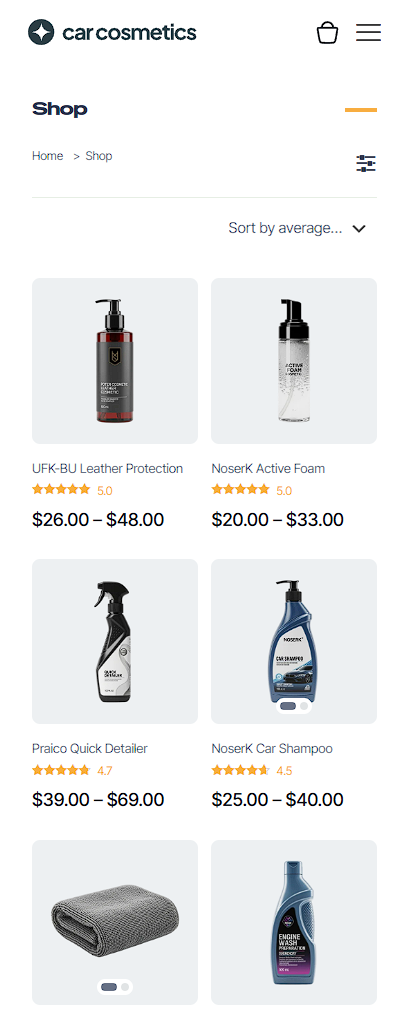
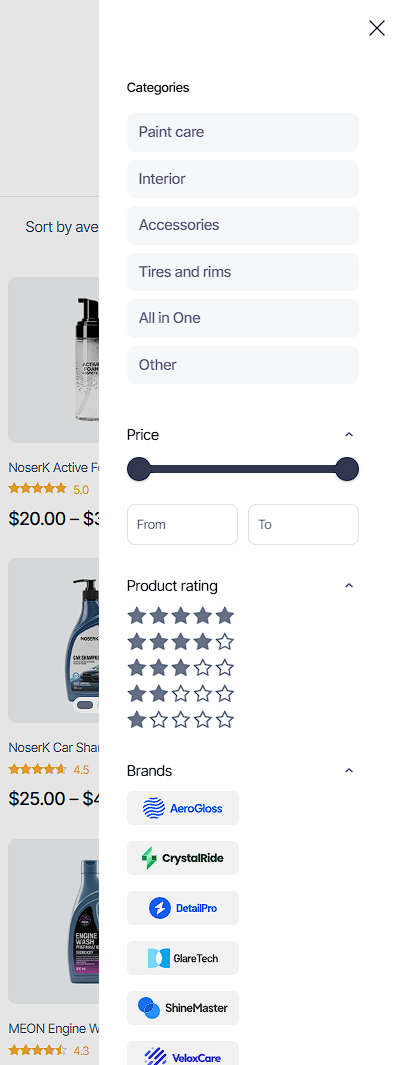
Comments
This is the link where you can see the menu:
https://themes.muffingroup.com/be/carcosmetics/product-category/interior/
Hi,
Please see the following video tutorial showing how to create such filters:
https://support.muffingroup.com/video-tutorials/ajax-advanced-filtering-live-product-filters-for-any-post-type/
To use it in a sidebar, you should put filters inside the Sidebar Menu template, and then you can trigger it with the icon element.
https://support.muffingroup.com/video-tutorials/sidebar-menu-vertical-header-builder/
Best regards
Hi Phil, thank you for the links. The issue I'm having is that when I create a Sidebar Menu template using BeBuilder, the Product Filter elements are not available in the items list to be added. Is there a specific shortcode I should use to display the BeTheme AJAX Product Filters inside a Sidebar template? Or is there a way to enable the 'Product Filter' module within the Sidebar Menu builder? I want to achieve the same look as the 'Car Cosmetics' demo where the filters are modern and AJAX-based, not the old WooCommerce default widgets. Thanks!
Do you have the newest version of Betheme installed?
There was one version where not all elements were available there, but now it is fixed.
Best regards