
Betheme Options not showing

Hi there, I am having a difficult time after an update.... the Betheme Options are not showing.
[Links visible only for registered users]
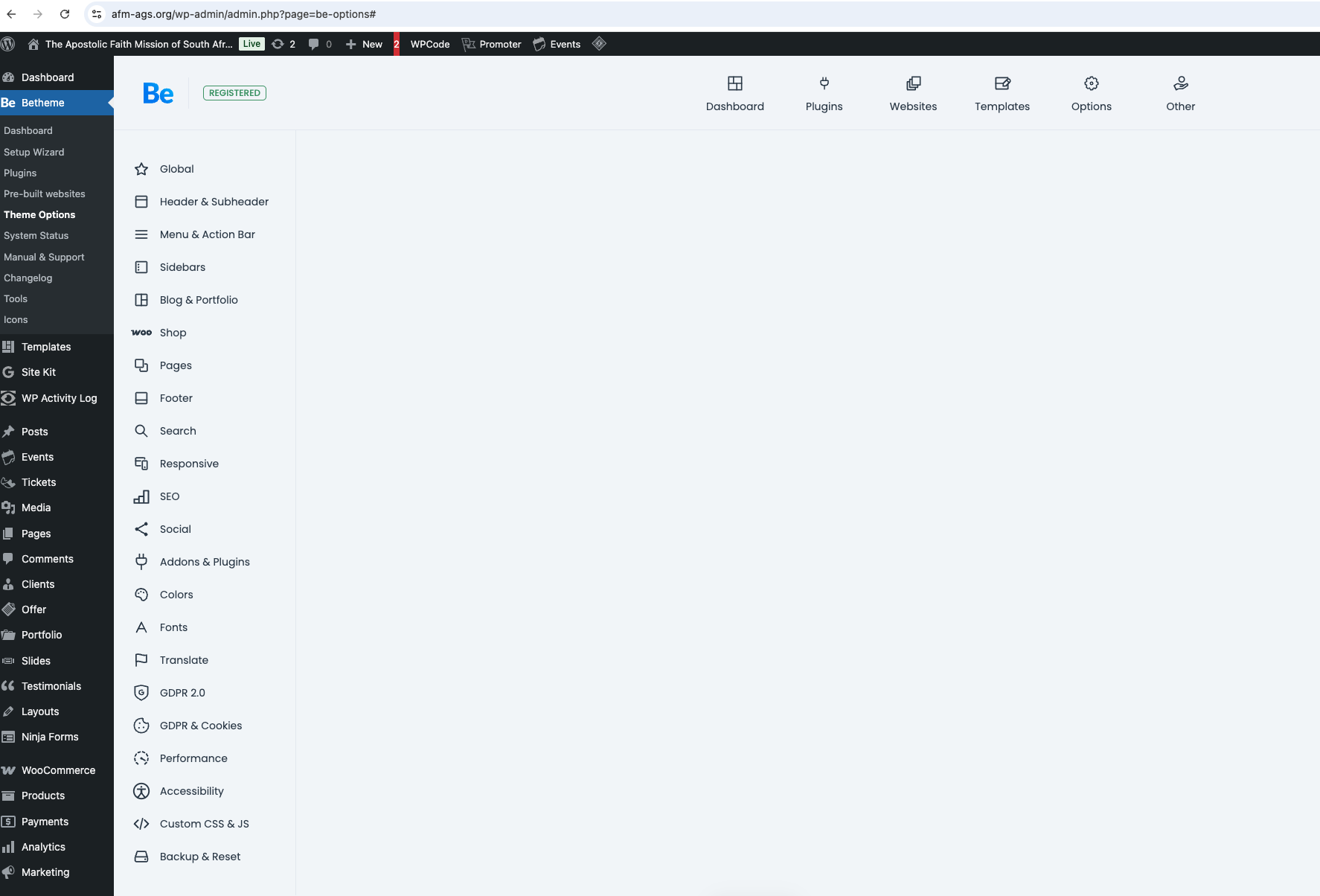
Hi there, I am having a difficult time after an update.... the Betheme Options are not showing.
[Links visible only for registered users]
Comments
Hello,
Please, turn off all of the plugins, refresh your cache, and check if the problem persists.
Moreover, if you use a child theme, switch to the parent, and recheck it.
Thanks
We do not use a child theme... we updated the betheme version and then the Google site kit plugin crashed the site after an update... will disable plugins to see whats happening...
We did deactivate plugins and it crashed the website........
Are you able to activate plugins back?
If so, you can find the culprit by disabling plugins one by one.
After you find which causes this, please contact the plugin author.
Best regards
But we have been using the same plugins for years and years with no problem.............. with Betheme. I always choose Betheme due to its stability and compatibility with many types of plugins. Please investigate, it happened only after a Betheme update...
Hi there -
we have isolated the problem, strangely it is 2 plugins owned by Google - Google Site Kit and Google for Woocommerce that are causing problems with Betheme..... we have these plugins on all our websites with no issue, including websites built with Betheme.....
But why is it causing trouble with only this website?!
If the plugin is not listed as supported by us, our help is limited:
https://support.muffingroup.com/documentation/bundled-plugins/#compatibility
In this situation, it is best to contact the plugin authors.
Thanks
Hi there - but we have used these same plugins with Betheme for many many many years with no issue at all. The reason we stick with Betheme is due to its great support, app, and compatibility with plugins.... why not give your customers what they need and want to get the job done?
While the plugins you are using are not on our official supported list, we are willing to take a closer look at your setup to see if we can identify the root of the conflict.
To help us investigate, please provide the following in a private message [Links visible only for registered users]:
That being said, please keep in mind that we cannot officially support every third-party plugin on the market. It is technically impossible to account for the code of every existing tool, and it is also up to the plugin developers to ensure their software follows WordPress standards and works correctly alongside major themes like Betheme. Please do not hesitate to ask them for support.
Thanks
Hi there - thank you, I do appreciate the support. Do you need both wordpress admin access and FTP access? Or can it just be the wordpress admin access?
We will need both WP and FTP access.
Thanks
Hi there - sorry yes you are on my list of things to do on Thursday 16 April - have been busy with a product launch.... sorry, I am coming I promise 😛
I have just received your private message, and the theme options open correctly for me:
Are there any steps to reproduce this issue?
Did you check that with another browser?
Best regards
Hi there - we had issues with 2 of the Google plugins - Site kit and google for woocommerce that were causing the builder or theme options to not show.... but we need the theme to be compatible with the google site kit and google for woocommerce plugins - as we have always used Betheme and never had any issue with Googles plugins....
Sorry, I did not notice that you do not have these plugins active.
Anyway, in your private message, you did not send FTP access.
Moreover, after I activated "Google for WooCommerce,"a critical error appeared in the dashboard, and it remained after I switched from Betheme to Twenty Twenty-Five, and the error remained:
It means that Betheme is not related to that specific error. There is also a possibility that this error causes blank Theme options, but I could not check that because of the lack of FTP credentials.
Did you try contacting the plugin authors in the meantime?
If you want us to inspect that further, please send a private message with all required information.
Best regards
Hi there - thank you for your support, it is kind of good to know its not betheme specific - funny though we have betheme on several websites with the google plugins and no error messages.... I wonder what all could be the problem.... I have not yet reached out to Google support - will be doing so.
Regarding the FTP creds let me try get these from the service provider.... I will revert as soon as I get it for you. Thank you so much.