
Urgent: Price Display Errors After Updating BeTheme to Version 28.5.9.1

Hi BeTheme Support Team,
We are experiencing a critical issue with the Shop Products and Shop Slider elements after updating BeTheme to version 28.5.9.1.
Immediately after the update, product pricing and variation-related text started displaying incorrectly across the shop elements.
Issues observed
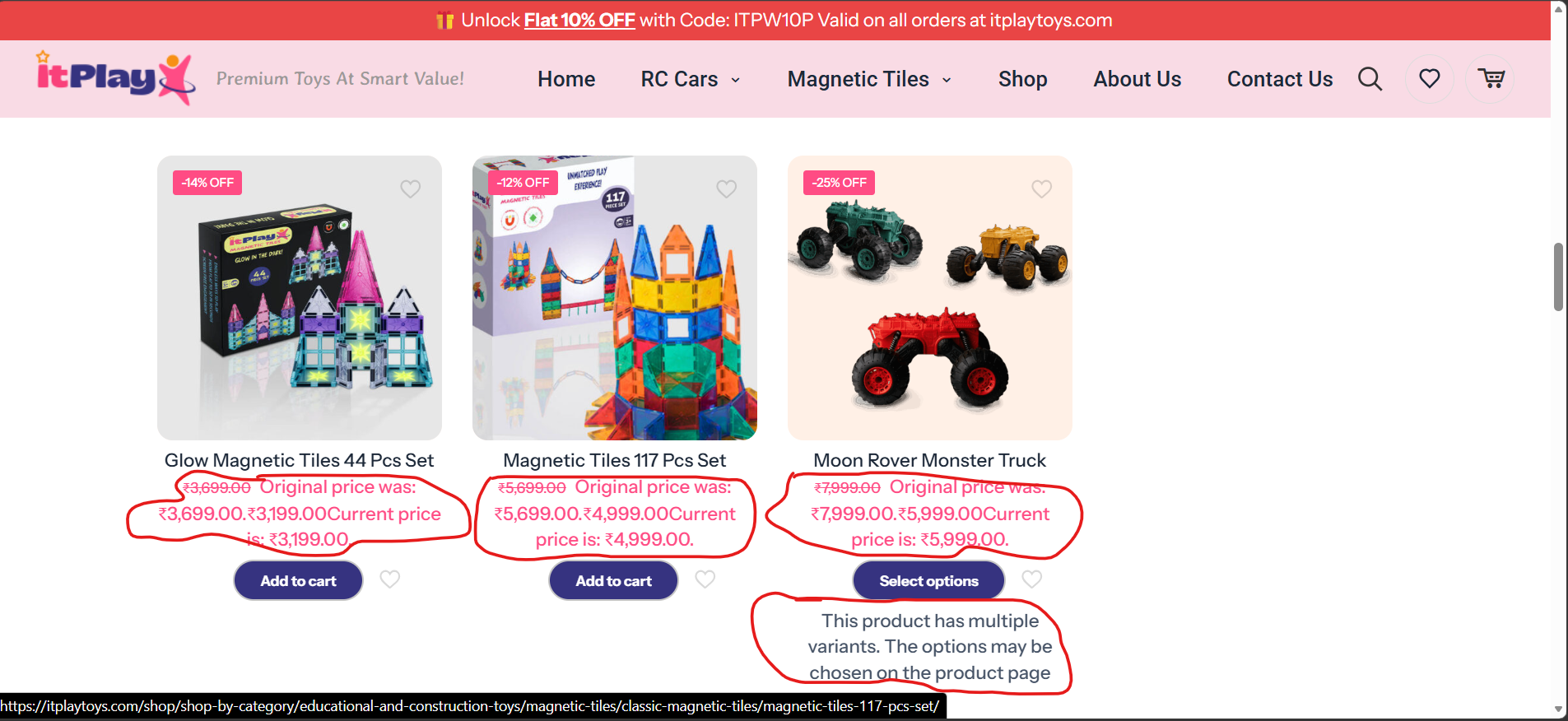
1. Product price is displayed twice
The product price is now appearing twice in the Shop Products and Shop Slider elements.
For example, instead of displaying the price once, the element is showing both the original/regular price and the current price in an incorrect or duplicated format.
2. Additional "Original Price" / "Current Price" text is appearing
Unexpected text has started appearing alongside the product pricing, including labels such as:
- "Original price was:"
- "Current price:"
These labels were not previously displayed and appear to have been introduced after updating to version 28.5.9.1.
3. Incorrect variation message is appearing
For products that have multiple variations, an additional message is now being displayed:
"The product has multiple variants. The option may be chosen on the product page"
This message is appearing directly within the Shop Products/Shop Slider product listing and was not present before the update.
Expected behavior
The shop product cards and Shop Slider should display the product information normally, with:
- The product price displayed only once
- Sale/regular pricing displayed in the standard WooCommerce format, if applicable
- No additional "Original price was" or "Current price" labels unless specifically configured
- No variation-selection message displayed within the product listing
- Products with multiple variations should simply link to the product page where the customer can select the required variation
This issue appears to be a regression introduced after updating BeTheme to version 28.5.9.1, as the same elements were working correctly before the update.
I have attached screenshots showing the affected products and the incorrect pricing/text for your reference.
Could you please investigate this urgently and let us know how we can correct these issues? If this is a known issue with version 28.5.9.1, please provide the recommended fix or patch as soon as possible.
Please also confirm whether this requires a BeTheme update, a WooCommerce compatibility fix, or any changes to the theme/element settings.
Thank you for your prompt assistance. This is affecting the presentation of products on our shop pages, so we would appreciate an urgent resolution.
Best regards,
Comments
Hi,
Thank you for your support.
We have resolved the issue with the help of your reply to another member’s support ticket. The issue was resolved by adding the relevant Page ID under Performance in the BeTheme Options.
Everything is now displaying correctly.
following disscution help us to solve our issue;
https://forum.muffingroup.com/betheme/discussion/80907/shop-slider/p1
Thank you again for your assistance.
Best regards,
Hi,
I am glad that you found the solution.
If you have any other questions or problems, feel free to ask.
Best regards