
"Blog News" element: CSS for article title not applied if heading level changed

Hello,

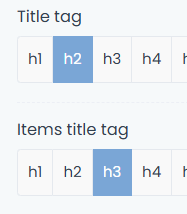
In your generated dynamic CSS code, the style for the heading is hard-coded as H5.

.mcb-section .mcb-wrap .mcb-item-y0idm3e .Latest_news .desc h5 a

If this is changed in the builder element, the CSS therefore does not apply.
The HTML is output as:
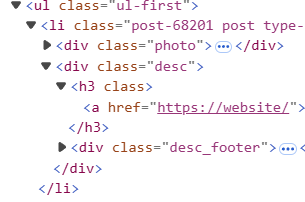
Could you please add a class to the heading tag and update the CSS to apply to the class, rather than H5 specifically?

You can view the development progress at https://tinyurl.com/ccy3cxv4

The sidebar has the element in it for now.

Thanks!

Comments

Sign In or Register to comment.
This website uses cookies

We use cookies to personalise content and ads, to provide social media features and to analyse our traffic. We also share information about your use of our site with our social media, advertising and analytics partners who may combine it with other information that you’ve provided to them or that they’ve collected from your use of their services.

Cookies are small text files that can be used by websites to make a user's experience more efficient.

The law states that we can store cookies on your device if they are strictly necessary for the operation of this site. For all other types of cookies we need your permission. This means that cookies which are categorized as necessary, are processed based on GDPR Art. 6 (1) (f). All other cookies, meaning those from the categories preferences and marketing, are processed based on GDPR Art. 6 (1) (a) GDPR.

This site uses different types of cookies. Some cookies are placed by third party services that appear on our pages.

You can at any time change or withdraw your consent from the Cookie Declaration on our website.

Learn more about who we are, how you can contact us and how we process personal data in our Privacy Policy.

Please state your consent ID and date when you contact us regarding your consent.