
We cannot find popup with inserted ID

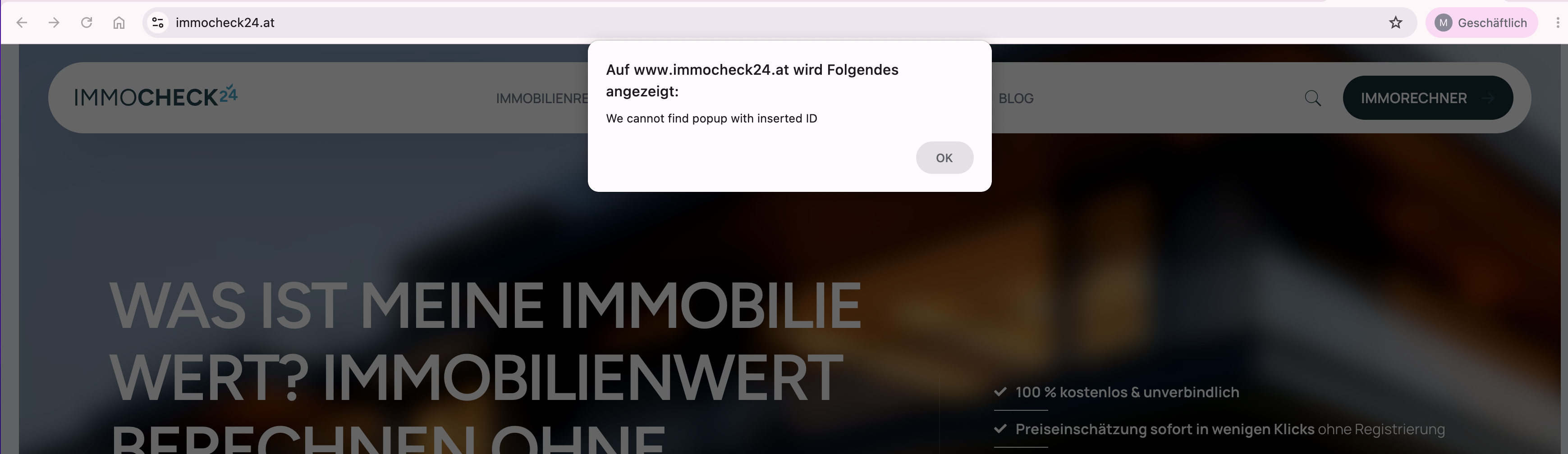
Hello BeTheme Support Team,
after updating BeTheme, my on-click popups no longer work correctly on most pages.
The error message is:
“We cannot find popup with inserted ID”
Important context:
The popups worked before the BeTheme update.
I created a popup with ID 342.
The popup is set to:
Display trigger: On click
Display conditions: Include → Entire Site
I also created a new test popup with ID 873 after the update, but the same issue happens with the new popup as well.
The strange part is:
The popup works on the blog page.
The popup does not work on normal pages / landing pages when it should be loaded globally via “Entire Site”.
Additional important finding:
If I assign/select the popup directly in the Page Options of the affected page, the popup works.
So the popup itself and the trigger are working.
However, I have multiple different popups on the website. Therefore, assigning one popup manually in the Page Options is not a workable solution for me. The popups need to work globally via Display Conditions → Entire Site, because different buttons should open different popups.
I tested several trigger variants, for example:
Popup testen
I also tested a native BeTheme button with “Open popup” and popup ID 873. This also does not work on the affected pages unless the popup is directly assigned in the Page Options.
On one affected page I checked the DOM with the browser console:
document.querySelector(’#mfn-popup-template-342’)
Result: null
Also: document.querySelector(’[data-id=“342”]’)
Result: null
This means the trigger/link is present on the page, but the popup template itself is not rendered in the DOM on the affected pages when using “Entire Site”.
On the blog page, the popup works.
On the affected normal pages, BeTheme cannot find the popup ID because the popup markup is not present in the HTML.
I also checked the available popup templates on the frontend with:
[…document.querySelectorAll(’[id^=“mfn-popup-template-”]’)].map(el => el.id)
On the page where it works, popup templates are available.
On the affected pages, the required popup template is missing from the DOM unless I assign it manually in the Page Options.
What I already tried:
1. Disabled custom code snippets that could affect the popup
2. Disabled plugins that could interfere
3. Created a completely new popup after the update
4. Tested a native BeTheme button
5. Tested a simple HTML link with class open-mfn-popup
6. Set Display Conditions to Include → Entire Site
7. Cleared cache
8. Checked the popup ID several times
9. Assigned the popup directly in the Page Options, which makes it work on that page
Current diagnosis:
The popup trigger seems correct.
The popup itself works when assigned directly in the Page Options.
But BeTheme does not inject/render the popup templates globally on normal pages via “Entire Site” after the update.
It only works on the blog page or when the popup is manually selected in the Page Options.
Can you please tell me what changed in the latest BeTheme update regarding popup rendering or Display Conditions?
Is there a known issue with multiple on-click popups and “Entire Site” display conditions after an update?
How can I make multiple different popups available globally again, so different buttons can open different popup IDs without assigning one popup manually per page?
Could this be related to page templates, footer hooks, BeBuilder layouts, or the popup being loaded only on certain page types?
Thank you.
Comments
Short update:
As a temporary workaround, I created a custom code snippet called “Fix Betheme Popup on Website”.
This workaround forces the required BeTheme popup templates to load on all pages, so the on-click popups can be opened again while waiting for the official BeTheme fix or final solution.
However, this is only a temporary workaround. The expected behavior should be that popups assigned via Display Conditions → Include → Entire Site are rendered globally by BeTheme without requiring a custom snippet or manual assignment in the Page Options.
Since I have multiple different popups on the website, I need the global popup rendering to work reliably again.
Hey,
Please send us the WordPress dashboard and FTP access privately through the contact form, which is on the right side at [Links visible only for registered users], and we will check what the reason might be.
Notice!
Please attach a link to this forum discussion.
Sending incorrect or incomplete data will result in a longer response time.
Therefore, please ensure that the data you send are complete and correct.
Thanks