
BeBuilder - Typography icon missing when editing templates

Hello,
We are experiencing an issue with BeBuilder.
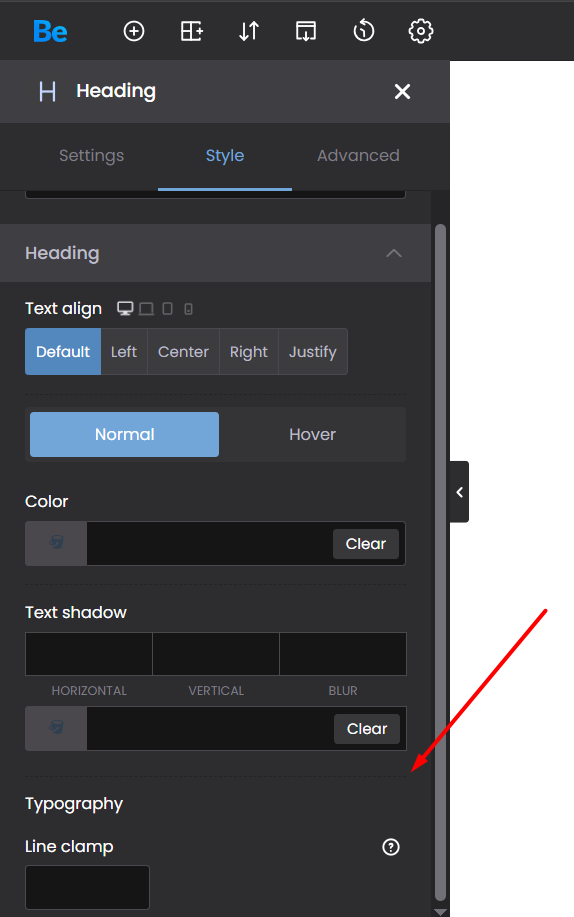
When editing a template with BeBuilder, the Typography icon/options are missing, so we cannot edit the typography settings.
We have already tried:
- Deactivating all plugins.
- Switching to the parent BeTheme.
- Testing with a previous version of BeTheme.
Interestingly, after installing an older version of BeTheme, the Typography icon appeared once, but after refreshing the page it disappeared again.
We also checked the browser console, but there are no JavaScript errors, only CSP "report-only" warnings.
Could you please help us identify the cause of this issue?
We are using:
- WordPress: 7.0.2
- BeTheme: 28.5.6
- PHP Version: 8.5.8
Thank you.
Comments
Hi,
Please send us the WordPress dashboard and FTP access privately thru the contact form, which is on the right side at [Links visible only for registered users] and we will check what might be the reason.
Notice!
Please attach a link to this forum discussion.
Sending incorrect or incomplete data will result in a longer response time.
Therefore, please ensure that the data you send are complete and correct.
Thanks