
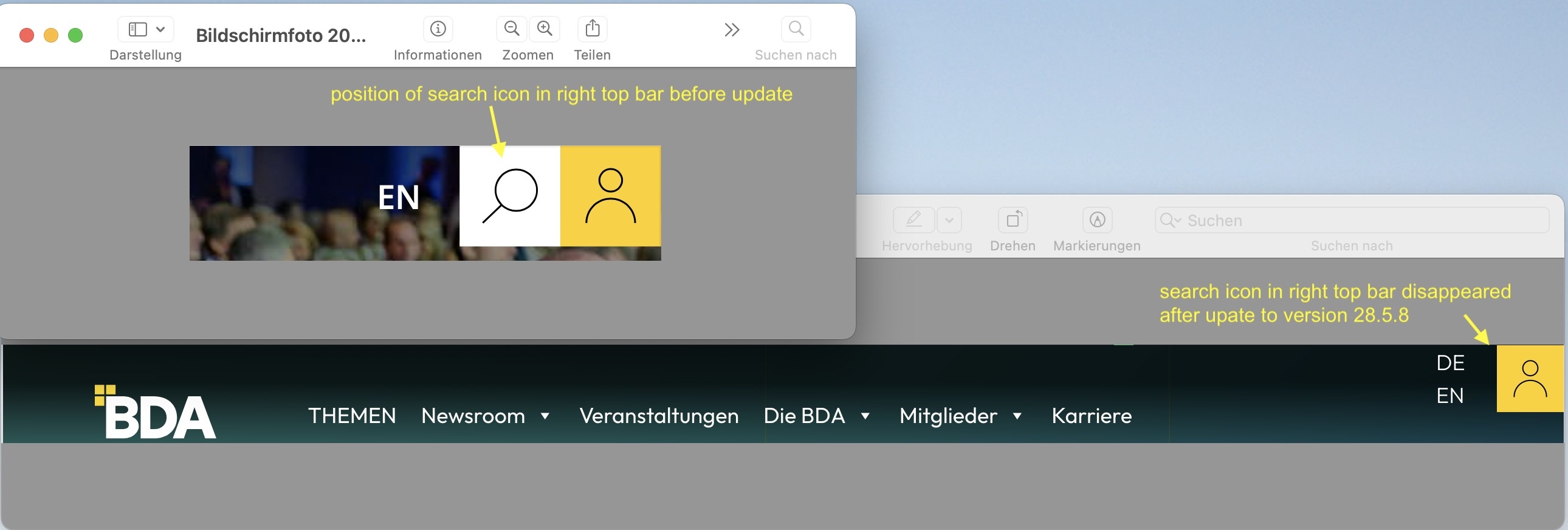
Search icon is missing in Header Extras (top bar right)

Dear team,
Since the BeTheme update to version 28.5.8, the search icon has disappeared from the header (top right bar). The website https://arbeitgeber.de uses a child theme with extensive customizations. I selected the search icon in the Theme Options, but it isn’t displayed. As soon as I switch from the child theme to the original BeTheme, the search function appears. I temporarily disabled the customized search in the child theme’s styles (frontend.css), but that didn’t help. The WPML language switcher and the action button are working perfectly after the update.
What can I do? Where might the problem be?
Best regards Anne
Comments
Hi,
If the problem is gone after switching from the child theme to the parent theme, it means that your child theme is the culprit. In our documentation, you can read:
Using a child theme usually means that you want to modify the core theme files. Any mistake in the code may render the page unusable. Please be careful when performing such actions because our support policy does not cover such changes and we will be not able to help you.
So, in that case, you should contact your web developer.
Best regards