
Bug when moving sections or elements in BeBuilder

When I try to move a section or an individual element in the BeBuilder editor, a bug occurs.
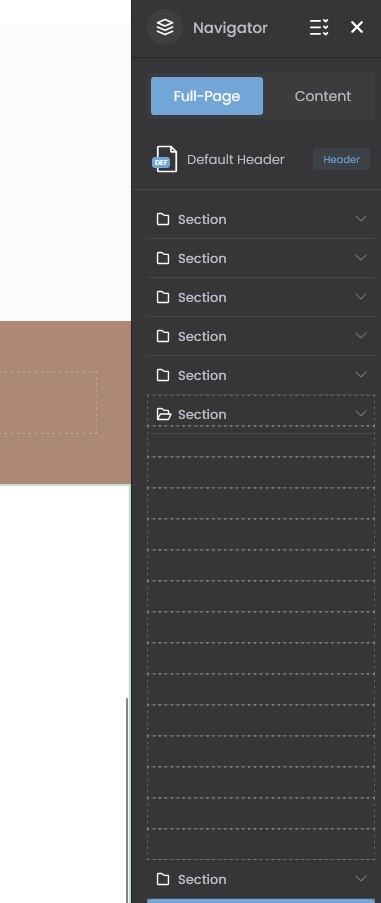
Instead of moving the selected item, multiple empty, dashed placeholder elements appear in the Navigator panel. The original section or element then becomes stuck and cannot be moved to the desired position.
Steps to reproduce:
- Open a page in the BeBuilder editor.
- Open the Navigator panel.
- Try to drag and move a section or an individual element to another position.
Actual result:
Several empty, dashed placeholders appear in the Navigator, and the selected item becomes impossible to move.
Expected result:
The section or element should move smoothly to the selected position without creating empty placeholders or affecting the page structure.
I've attached a screenshot showing the issue.
Could you please investigate and help me resolve this bug?

While waiting for a response from one of our team members, we recommend to check Support Center where it is highly likely that you will find the answer to your question in no time.
FAQ | Video Tutorials | How to