
How To Hide Post Date on Blog Slider Preview?

Hey There,
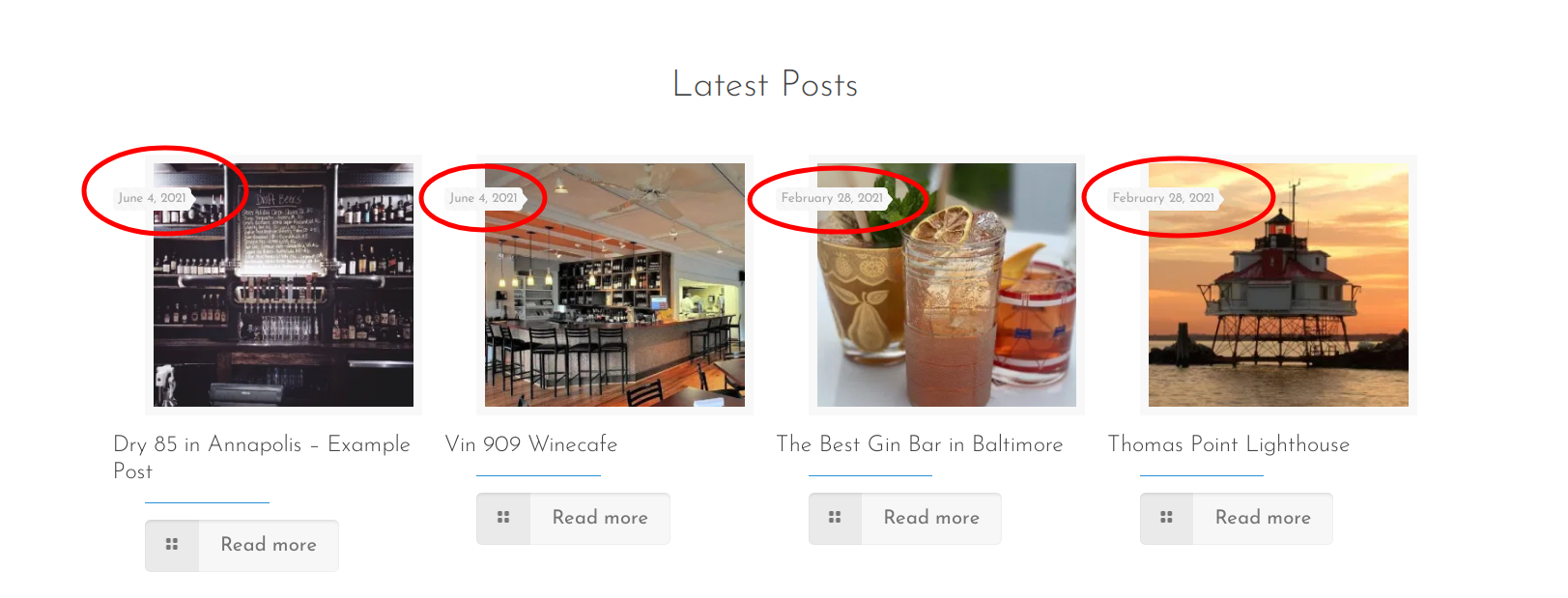
I searched the forum to see if this was already a discussion but couldn't find anything. Is there a way to hide the date on the posts? My client doesn't necessarily want the publication date shown on the preview for the posts using the Blog Slider element in BeTheme. Is there a way to turn it off? I looked around in the theme options but couldn't find anything.
Here is a link to the site: [Links visible only for registered users]
And I've attached a screenshot so you know what I'm referring to.
Thanks!
Comments
Hello,
To achieve that, you will have to write CSS code and place it in Betheme -> Theme options -> Custom CSS & JS -> CSS.
Do you need help with writing it?
Best regards
Hi,
Yes, please. I need help writing it.
Please, use the following code:
.blog_slider .date_label{
 display: none!important;
}
Thanks
Awesome! Thank you!
Hi Again,
It looks like that solved the issue of removing the dates on some of the posts, but not all. Is it possible to get the css code from you that would remove the date from showing up on any of the pages?
And one more issue...
In the regional pages (Baltimore, Annapolis, Delmarva Peninsula etc.) I'm trying to set it up to show multiple categories for posts using the Blog Slider feature, such as, See & Do/Delmarva Peninsula or Eat & Drink/Baltimore. I have tried using the multiple categories function using both a space and no space between the slugs and commas, but it's still showing all categories for that region instead of just showing for example posts that are categorized as both See & Do and Delmarva Peninsula.
How do I make it so the blog slider will show only posts that are categorically marked for both Delmarva Peninsula AND See & Do?
Here's an example of trying it both ways with neither working.
Thank you!
1) If you want to remove the date generally from your posts on the website, please, go to Betheme -> Theme options -> Blog, Portfolio & Shop -> Blog, and uncheck the Date from Meta.
2) If you want to show posts from two categories, the Category dropdown should be set to All, and you need to use only the Multiple Categories field.
Thanks
I looked and I've never had the blog meta date box checked. Could it be somewhere else?
[Links visible only for registered users]
Okay, I tried switching the category to "All" and then using the multiple categories by using a comma to separate the category slugs, but that also didn't work. I tried using a space and not using a space and that didn't work either.
All of the categories are showing up in the blog slider feed instead of it showing up as by region and then sub-category, such as Delmarva Peninsula / Eat & Drink.
Can you tell me what I'm doing wrong? Thanks
Are you using some kind of caching plugin, or do you have a caching tool on your server?
If yes, please, turn it off because it might hold the setting from before your changes. After that, check if the date on the posts is still there and if the categories for the slider works properly.
Thanks
Hi Phil,
No, I'm not using any sort of caching tool. Any other ideas for removing the dates as well as the blog slider categories issue?
Please send us WordPress dashboard access privately thru the contact form, which is on the right side at [Links visible only for registered users], and we will check what might be the reason.
Notice!
Please attach a link to this forum discussion.
Thanks
1) I did not notice that you were using the Blog News item. With it, you need to remove the date with the following code:
.Latest_news ul li .desc_footer .date{
   display: none!important;
}
2) For the posts, you will have to create a third category that will have assigned only posts you want to display and select it in the options.
Thanks
Thanks so much. I've added the additional categories as a fix for the second issue. I'm still seeing the dates show up on the posts in a few places. Related posts and Recent Posts in the footer.
See attached screenshots.
I hope that will do the job:
.section-post-related .post-related .date_label{
display: none!important;
}
#Footer .Recent_posts ul li a .date{
   display: none!important;
}
If you find it anywhere else, please, let me know. ?
Thanks
It sure did! Thanks so much for your help!
Thanks a lot !
Very useful ;-)
Gery