
SubMenu align right at the edge of the screen

Dear Muffin Group,
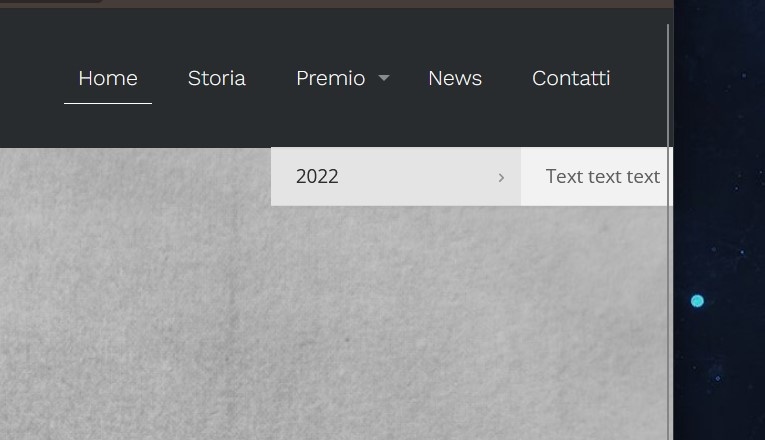
as you can see in the screenshot the submenu remain at the edge of the screen, please do you help me to fix it?
Thank you best regards.

Dear Muffin Group,
as you can see in the screenshot the submenu remain at the edge of the screen, please do you help me to fix it?
Thank you best regards.
Comments
Hi,
Please, go to Betheme -> Theme options -> Menu & Action Bar -> Menu, check the option Submenu | Fold last 2 to the left, and check if the problem persists.
Thanks
Thank you for you reply,
i checked the option but it does not worked
Please attach a link to your website so we can check it out. If the page is offline(localhost), then our help will be limited. You will have to contact us when the page is online. Also, please make sure that the page is not under maintenance before you provide us with the link.
Thanks
Thank for your reply,
this is the link:
Please if you can, align the submenu center end exactly under the menu item.
Thank you
Like this but centered under the menu item!
Please, use the following CSS code:
#Top_bar .menu li ul li ul {
 left: 80px!important;
 top: 48px!important;
}
Put it in Betheme -> Theme options -> Custom CSS & JS -> CSS.
Thanks
Thank you for your reply,
but this solution works only in the thrid position of menu, i have moved the item to the last position and the the fix does not work anymore. Please can you fix this problem for good.
Best regards
Please send us WordPress dashboard access privately thru the contact form, which is on the right side at [Links visible only for registered users] and we will check what might be the reason.
Notice!
Please attach a link to this forum discussion.
Sending incorrect or incomplete data will result in a longer response time.
Therefore, please make sure that the data you are sending are complete and correct.
Thanks
I have commented out the CSS I have sent, and the option Submenu | Fold last 2 to the left works correctly.
Best regards
Thank you for your support! I apprecieted