
Lottie Trigger not Working

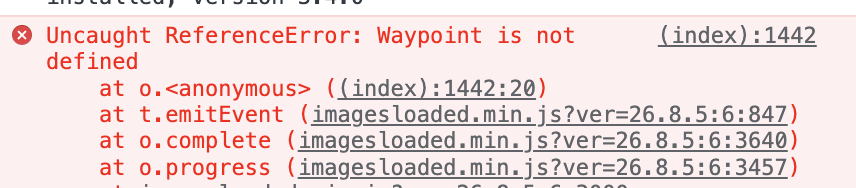
Hi, in Bebuilder, I insert a Lottie Element, and I set the trigger to Scroll or Viewport, but it doesn't work in either case. The animation never starts. It works fine in OnOver and OnClick cases. I get an error in the console, only when I add a Lottie element.
I need help!
Thanks!
Comments
Hello,
Please, turn off all of the plugins, refresh your cache, and check if the problem persists.
Moreover, if you use a child theme, switch to parent, and recheck it.
If this will not help, please send us the WordPress dashboard and FTP access privately thru the contact form, which is on the right side at [Links visible only for registered users], and we will check what might be the reason.
Notice!
Please attach a link to this forum discussion.
Sending incorrect or incomplete data will result in a longer response time.
Therefore, please ensure that the data you are sending is complete and correct.
Thanks
Sorry, but you sent incomplete data. You did not attach FTP access.
Moreover, when I tried to create a new page for testing JSON error appeared.
Please, check the following article, and follow the tips from there regarding this.
[Links visible only for registered users]
If none of them will help, please, contact your hosting provider, and ask to allow all the rules that ModSecurity blocks incorrectly.
When you handle the problem with JSON error, please send another message with complete data.
Thanks
+1 for this issue.
Lottie element placed and animation working on click or hover, but not on scroll or viewport - with JS error as described in the screenshot complaining of "Waypoint" not defined.
Please try recreating on your own development platform with the first free Lottie file available from [Links visible only for registered users] (Confetti)
Hey @chrismcb6,
Please send us the WordPress dashboard and FTP access privately thru the contact form, which is on the right side at [Links visible only for registered users], and we will check what might be the reason.
Notice!
Please attach a link to this forum discussion.
Sending incorrect or incomplete data will result in a longer response time.
Therefore, please ensure that the data you are sending is complete and correct.
Thanks
Sorry, this is not available.
Can you please try replicating your local development?
We found the culprit.
It will be fixed in the upcoming update.
Best regards
Great, thanks - much appreciated.