
Responsive broken after update: Positioning conflict in Wraps between old and new version

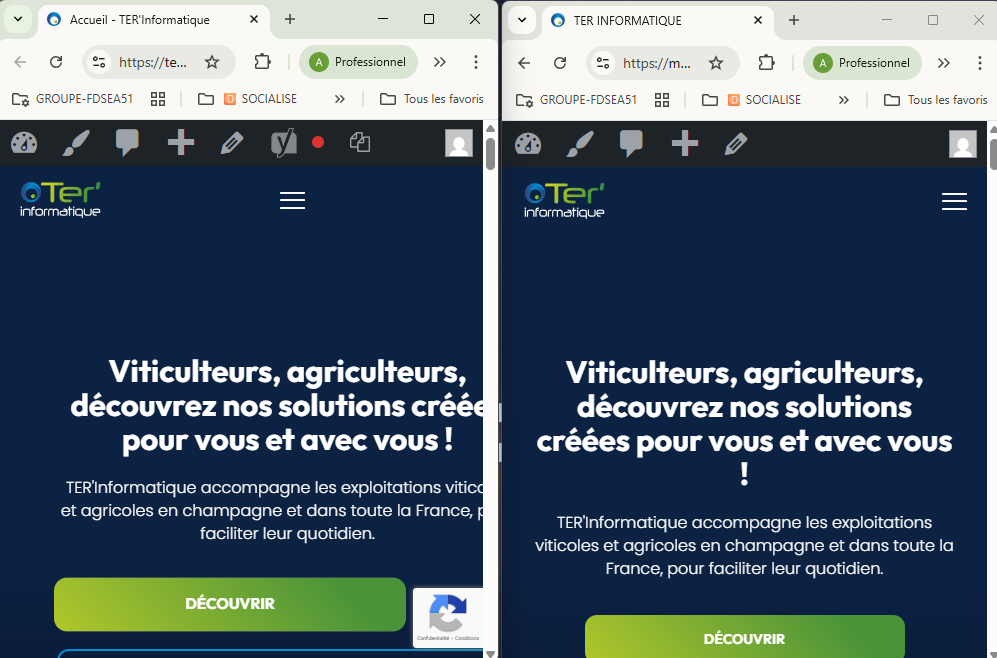
Hello Support Team,
I am facing a critical responsive issue on my website after updating to the latest version of Betheme. The entire layout is shifting horizontally on mobile devices, and I’ve isolated the cause: it seems to be related to the Wrap positioning settings which have changed between versions.
Context:
- Theme: Betheme (Updated from ex: 27.3.7] to [ ex: 27.4.4]).
- Environment: Issue reproduced on both Live and Staging sites.
- Plugins: Tested with all plugins disabled; the issue persists.
The Issue: I noticed that the Wrap configuration options (Positioning/Display) are not handled the same way in the new version. In the previous version, my Wraps were perfectly contained, but now, the "Positioning" settings seem to force a width or a displacement that breaks the mobile viewport.
Specifically, the Burger Menu seems to trigger a calculation error in the grid, causing the entire page to overflow horizontally (horizontal scroll).
What I've observed:
- In the Muffin Builder, the Wrap settings for 'Position' or 'Display' differ between my old backup and the new update.
- The mobile menu (burger) seems to inherit a fixed width or a wrong offset from these new Wrap properties.
- Even with
overflow-x: hiddenon the body, the internal grid remains shifted.
Could you please explain what has changed in the Wrap positioning logic in this latest update? Is there a specific setting I need to toggle to restore the previous behavior?
I can provide my URL and WP credentials in a private message if needed.
Thank you for your help.
Comments
Hey,
Please send us the WordPress dashboard and FTP access privately through the contact form, which is on the right side at [Links visible only for registered users] and we will check what the reason might be.
Notice!
Please attach a link to this forum discussion.
Sending incorrect or incomplete data will result in a longer response time.
Therefore, please ensure that the data you send are complete and correct.
Thanks
PS. Please note that there is no longer Muffin Builder, but BeBuilder. We changed its name long time ago
I have corrected your mobile header by changing the position in the wrap with the hamburger menu:
The layout shift is caused by your custom CSS code:
To find which is the culprit, remove your custom CSS one by one.
Best regards
Merci beaucoup pour votre retour !
Alors certes cela remet le bon alignement de mon texte, mais en dessous et sur mes autres pages, même en supprimant le css en intégralité j'ai des problèmes de positionnement.
Pas de décalage dans le constructeur du thème, et décalage en actualisant.
Tout le css additionnel a été supprimé avant la modification.
Je veux juste savoir ce que je peux faire, si il faut que je retravaille toutes mes pages svp? si il y a un correctif ? Merci par avance
Please use English language so we can avoid confuse and provide best possible solution.
Thank you very much for your feedback!
So, yes, that does restore the correct alignment of my text, but below that and on my other pages, even after removing all the CSS, I’m still having positioning issues.
There’s no misalignment in the theme builder, but it appears when I refresh the page.
All additional CSS was removed before making the change.
I just want to know what I can do – do I need to rework all my pages, please? Is there a fix? Thanks in advance
You have some values that are not adjusted for mobile view. For example left margin for a wrap:
or a custom width for the button:
You must adjust the mobile view.
https://support.muffingroup.com/video-tutorials/responsive-editing-in-bebuilder/
Best regards