
Slider not filtering categories

Hi! I'm pretty new to the BeTheme builder and templates, and I'm relying heavily on the forum and youtube tutorials to solve certain things I wan't to know and don't understand how.
I intend to create a slider using the following method: section, queery loop, dynamic data (from slides I've created from the WPadmin), up until that point, everything works nicely, however, my main issue is that I can't find any option to filter the slider by using the categories I created in the slides section, and it's just showing every slide, wich I don't want.
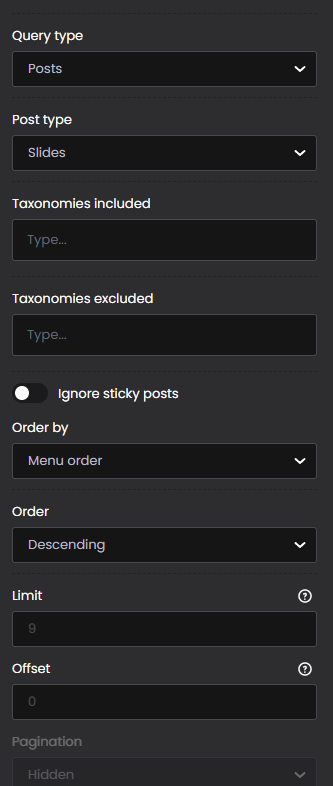
Here are the options I get from the builder, and I can't seem to find any way to solve this no matter where I look. Is there something I'm doing wrong, or a new method I could try? I've even tried the slider tool, but it doesn't filter anything either.
Thanks in advance
Comments
Hi,
There is a bug related to the category search and that is why it does not work for you.
We plan to release a fix to this issue this week.
Best regards
Hi!
Thank you all. I'll be waiting for it then.
Have a great day!
The update is available, so please update Betheme to the newest version.
Thanks
Hi! My betheme is updated, however I still can't find a category filter in putting the section as "query loop". Where did you put it?
I did find it in the slider tool available, but I found out that it allows me very little control over the design, the image size and the display of slides for the responsive, which I managed to design more freely with the former method. I don't know if it would be possible to reinstate the categories on the former, or allow for the same amount of freedom that putting a section in "query loop" offers to the slider tool.
Thank you
Please send us the WordPress dashboard and FTP access privately through the contact form, which is on the right side at [Links visible only for registered users], and we will check what the reason might be.
Notice!
Please attach a link to this forum discussion.
Sending incorrect or incomplete data will result in a longer response time.
Therefore, please ensure that the data you send are complete and correct.
Thanks
Thank you! I've sent you all the information.
I hope there's an easy and quick solution
I have checked that and categories are searchable:
I have saved that, so you can check this out.
Best regards
Oh it works! Thank you so much!