
Special characters break variation selection

BeTheme 29.0.5’s custom variation dropdown can display the wrong global attribute term and disable an in-stock variation.
For example, an attribute contains #10 (slug 10) and 10" (slug 10-2). A product assigned only 10" displays a disabled #10 instead. The native WooCommerce selector correctly contains 10" / 10-2.
The relevant code is in functions/theme-woocommerce.php, within mfn_display_custom_attributes():
- Line 691 retrieves term names.
- Lines 750–751 try a slug lookup before the name lookup in the dropdown branch.
The name 10" sanitises to 10, matching the other term.
You can check this at [Links visible only for registered users]
Product config:
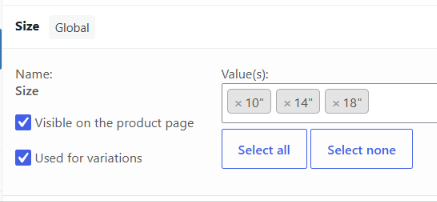
Could you please investigate this behaviour?

While waiting for a response from one of our team members, we recommend to check Support Center where it is highly likely that you will find the answer to your question in no time.
FAQ | Video Tutorials | How to