

Special characters break variation selection

BeTheme 29.0.5’s custom variation dropdown can display the wrong global attribute term and disable an in-stock variation.
For example, an attribute contains #10 (slug 10) and 10" (slug 10-2). A product assigned only 10" displays a disabled #10 instead. The native WooCommerce selector correctly contains 10" / 10-2.
The relevant code is in functions/theme-woocommerce.php, within mfn_display_custom_attributes():
- Line 691 retrieves term names.
- Lines 750–751 try a slug lookup before the name lookup in the dropdown branch.
The name 10" sanitises to 10, matching the other term.
You can check this at [Links visible only for registered users]
Product config:
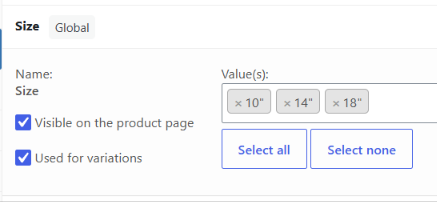
Could you please investigate this behaviour?
Comments
Hey,
Please send us the WordPress dashboard and FTP access privately through the contact form, which is on the right side at [Links visible only for registered users], and we will check what the reason might be.
Notice!
Please attach a link to this forum discussion.
Sending incorrect or incomplete data will result in a longer response time.
Therefore, please ensure that the data you send are complete and correct.
Thanks
Thanks, details sent.
We have corrected it on your website.
Please check it out.
Best regards
Thanks for sorting this. I’ve checked the affected products and the variation selections are now working correctly.
Following up on the global-attribute fix in this thread: that resolved the originally reported quotation-mark/hash collision, but I have found a related regression with local product attributes in the revised dropdown code. It is still present after updating to BeTheme 29.0.6.
Local attributes such as “Fittings”, “Jet Type” and “Length of Hose” produce empty theme dropdowns. Their variations still exist, and the native WooCommerce dropdowns contain the correct options.
In functions/theme-woocommerce.php, mfn_display_custom_attributes() now uses:
$variation_attributes = $product->get_variation_attributes();
$options = $variation_attributes[$atr_slug] ?? [];
For local attributes, WooCommerce keys that array by the original attribute name, such as “Fittings” or “Length of Hose”. BeTheme looks it up using the sanitised key, “fittings” or “length-of-hose”, so the lookup returns an empty array. Global taxonomy keys such as pa_size already match.
I applied this small correction:
$variation_attributes = [];
foreach ($product->get_variation_attributes() as $name => $values) {
$variation_attributes[sanitize_title($name)] = $values;
}
$options = $variation_attributes[$atr_slug] ?? [];
Before the correction, the dropdowns were empty on two products using local attributes. Three control products using global Size, Length and Extension Sections attributes worked correctly.
After the correction, all six tested attribute dropdowns across those five products matched the native WooCommerce option values and labels. All 32 available variations passed direct add-to-basket checks with the expected SKU, quantity and ex-VAT unit price. Variation IDs, SKUs, prices and returned stock/availability fields were unchanged.
These checks covered the generated HTML and direct WooCommerce basket requests, rather than interactive browser/JavaScript testing. Fresh server downloads confirmed the issue in the 29.0.6 parent theme; the child theme has no variation-selector or WooCommerce template overrides.
Please could you incorporate this correction into the next release so local attributes work alongside the earlier global-attribute fix?
We have a fix for that already completed, and it will be released in the next update.
Best regards
Thank you